
The first tailgater I ever watched slip through a corporate lobby walked in behind an employee carrying a coffee tray and a laptop bag. Nobody stopped her. The receptionist waved. The security guard nodded. That single moment is why barrier optical hardware exists, and it’s also why a lot of buildings buy it for the wrong reasons.
Here’s the honest answer up front: a security turnstile earns its cost when you have a steady flow of people, a real tailgating problem, and a lobby that visitors actually see. If you run a warehouse entrance with a badge wall and two guards, you probably don’t need one. If you’re designing a new headquarters lobby where the reception desk sits forty feet from the front door, you almost certainly do. Understanding the difference comes down to a few concrete questions about traffic, aesthetics, and what you’re actually trying to stop.
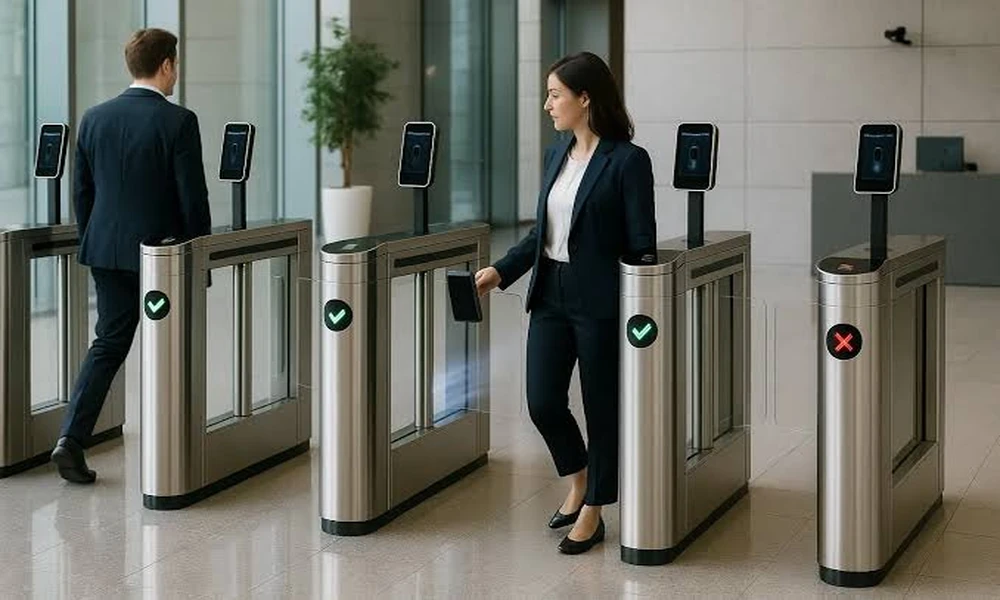
A speed gate turnstile blends optical sensors with a physical flap barrier, so it can detect an unauthorized second person while also blocking the lane with glass or acrylic panels. That combination is the whole point, and it’s where most buying decisions go sideways. Facility managers often compare it to a plain optical turnstile and assume the only difference is the flap. It isn’t. The barrier changes your throughput, your ADA layout, and your visitor flow all at once.
What a barrier optical gate actually solves
Plain optical turnstiles use infrared beams to count bodies and sound an alarm when two people pass on one credential. They’re elegant, and they’re fast. What they don’t do is physically stop anyone. A determined walker just keeps going, and your guard chases them across the marble. A barrier adds the flap, which closes the gap between “we noticed” and “we prevented.”
That distinction matters most in lobbies where the reception desk isn’t staffed every hour. Think about a Saturday morning at a tech campus, or a leasing office after five. The flap does the work a guard would do, quietly, without a confrontation. In my experience reviewing access designs, that’s the single strongest argument for the barrier version, and it’s the one salespeople skip because it’s harder to put on a datasheet.
You’ll also want to think about credential types before you commit. Card readers, mobile credentials, and biometric readers each change the lane timing slightly, and the flap logic has to match. Get this wrong and you’ll be tuning sensor sensitivity for months.
Tailgating math: the number that decides it
Every facility has a tailgating rate, whether or not anyone measures it. In a busy lobby, even a low rate of unauthorized entries per day adds up to a meaningful amount of unvetted foot traffic over a year. You don’t need a study to see the pattern. Stand by your entrance for an hour at peak and count how many people pass on one badge swipe. That number is your starting point, and it’s more useful than any vendor benchmark.
For the compliance side of the argument, it helps to know that access control hardware often needs to meet recognized safety and electrical standards, and UL Solutions maintains the testing frameworks most manufacturers build to. Ask any turnstile vendor which listings their equipment carries before you sign. If they can’t answer in one sentence, that tells you something.
ADA lanes are not an afterthought
This is where projects go over budget. Barrier optical arrays need at least one wider passage lane for wheelchairs, strollers, luggage carts, and anyone who simply moves slower. The ADA width requirement means that lane’s cabinet spacing, flap size, and sensor pattern all differ from a standard lane. If you plan four standard lanes and squeeze in the accessible one later, you’ll be tearing up flooring.
Federal facilities have additional expectations layered on top of accessibility rules, and the U.S. General Services Administration publishes guidance that shapes a lot of public-sector lobby design. Even in private buildings, that guidance is worth a read because it reflects how security consultants think about lobby screening.
My rule of thumb: put the accessible lane closest to the reception desk, not at the far end. Visitors who need it usually want a human nearby, and staff can see the lane from where they sit.
Speed gate turnstile, optical turnstile, or full height: a quick decision table
Here’s how I’d sort the three main options if a client asked me over coffee.
| Option | Best for | Watch out for |
|---|---|---|
| Plain optical turnstile | High-volume lobbies with staffed security nearby | Alarm only, no physical stop |
| Barrier optical (speed gate) | Visible lobbies that need both looks and a real barrier | Higher cost per lane, sensor tuning |
| Full height turnstile | Perimeter entries, industrial yards, unattended doors | Slower throughput, heavier footprint |
The barrier model wins the lobby argument almost every time, because it’s the only one that looks like furniture while behaving like a door. Full height units are fantastic but they belong at the back gate, not the front desk.
The walkthrough I use before signing a quote
Run this checklist in person, ideally during your busiest hour. It takes about thirty minutes and saves months.
- Walk the lane yourself with a bag, a coat, and a coffee. Count how many times the flap surprises you.
- Time ten people passing through one lane with valid credentials. That’s your real throughput, not the brochure number.
- Check whether the array can be expanded later without replacing the control head.
- Ask where the equipment is built and whether the factory holds an ISO 9001 certification.
- Confirm the finish options match your lobby, because a stainless cabinet in a warm wood interior looks like a mistake.
One more practical note on installation. These units are heavy, they’re anchored into finished flooring, and they need power and data run to each lane. Coordinate with your electrical contractor early or you’ll be looking at surface conduit in a brand-new lobby. I’ve seen that fight, and the architect never loses gracefully.
Safety codes and the paper trail
Any barrier that can close on a person raises an obvious question: what happens when someone gets caught? The answer lives in the sensor design and in recognized safety standards. The Occupational Safety and Health Administration sets the general expectations employers work under for workplace equipment, and your manufacturer should be able to walk you through how their flap logic handles obstruction, reversal, and emergency release.
Ask for the datasheet, the installation guide, and the wiring diagram before purchase, not after. A vendor who hesitates on any of the three is telling you how the next two years will go.
So does your lobby need one?
Yes, if unbadged visitors are walking past a reception desk that can’t see the door, if your badges get shared more than anyone admits, and if the entrance is part of your brand. No, if the door is already staffed by someone whose only job is to watch it, or if your traffic is measured in dozens per day and the budget belongs somewhere else.
The middle case is the interesting one, and it’s where most buildings land. In that situation I’d buy fewer lanes than the lobby visually wants, place them where they create a natural funnel, and leave room to add a lane when the headcount grows. Hardware you can expand beats hardware you overbuild.
Walk your entrance tomorrow morning at peak and count the tailgaters. If the number surprises you, you already have your answer.

Comments are closed.